كيف تعرف ان هاتفك الاندرويد مزيف ام لا

0 التعليقات

كيف تعرف ان هاتفك الاندرويد مزيف ام لا


لقد بدات في الفترات الاخيرة الكثير من عمليت التزوير للهواتف الذكية و الان سوف نتعرض الفرض بين الهواتف الاصلية و المزيفة 

و هذه صورة توضح الفرق بين الهاتف galaxy s3 الاصلي و الهاتف galaxy s3 مزيف ( مقلد )

اضغط علي الصورة لتكبيرها

و فيما يلى بعض النقاط الواضحه لمعرفه الفرق :

  • النسخه المزيفه أخف في الوزن
  • ابعاد النسخه المزيفه مختلفه عن الاصليه
  • الكاميرا في النسخه المزيفه جودتها سيئه جدا
  • النسخه المزيفه تعمل علي اندوريد 4.0
  • الشاشه في النسخه المزيفه ليست من نوع AMOLED ولا يوجد فيها زجاج الجوريلا Gorilla Glass 2
  • الذاكره العشوائيه RAM منخفضه جداً
  • مساحه التخزين منخفه
  • شاشه القفل لا يوجد بها تاثير الموج
  • لا يدعم خصائض Eye tracking or Smart Stay

 و في الاخبر ارجو ان لا تقعو في فخ الهواتف المزورة

شرح بالصور : موقع مهمل لعمل بريد مؤقت

0 التعليقات

شرح بالصور : موقع مهمل لعمل بريد مؤقت

السلام عليكم

اليوم سوف اقدم لكم شرح موقع مهمل لدخول للموقع من هنا

ما هو مهمل

هو بريد الكتروني تنتهي مدته بعد مدة وجيزة (45) دقيقة ,, و يمكن أستخدامه طول هذه المدة

أستخدامات مهمل

يستخدم عادة في التسجيل في المواقع و المنتديات لكي لا تملي بريدك باشعارات و اعلانات المواقع 

مدة البريد ( الايميل )

45 دقيقة قابلة للتمديد

الخصوصية 

الخصوصية تامة سوف يتم حذف جميع الرسائل بعد انتهاء مدة البريد ,, اذا سجل احد اخر بنفس بريدك لن يجد رسائلك
 شرح التسجيل
عند الدخول الي الصفحة الرئيسية نضغط علي " أنشاء بريد عشوائي "
سوف ينقلنا الي بريد عشوائي يمكن أستخدامه مباشرة 

طريقة التخلص من اعلانات تطبيقات الاندرويد

0 التعليقات

طريقة التخلص من اعلانات تطبيقات الاندرويد

الكثير منا ينزل لعبة او تطبيق ,, او يتصفح الانترنت ,, تظهر لك تلك الاعلانات المزعجة في اسفل الصفحة او فوقها او جانبيا 
اليوم سوف اريكم طريقة التخلص منها عبر هذا البرنامج الرائع (Ad-way)

طريقة تتسطيب و تنزيل البرنامج 

  • اولا يجب عليك عملت روت للجهاز

  • البرنامج مجاني تماما يمكنك تحميل البرنامج من هنا

  • بعد تحميل البرنامج سطبه مباشرة 
  • افتح البرنامج اضغط علي  " تحميل ملفات و تطبيق حظر الاعلانات "
  • اضغط  علي وافقة
  • سوف يعمل الجهاز اعادة تشغيل و سوف يفتح البرنامج و الهاتف معك طبيعي
البرنامج لا يشكل اي خطورة علي هاتفك

تطبيق للرد على المكالمات داخل أي تطبيق في أندرويد دون الخروج منه

0 التعليقات


عند ورود أي مكالمة في الأجهزة التي تعمل بنظام أندرويد، يتم إيقاف العمل على أي تطبيق مؤقتاً لتظهر واجهة المكالمة ليختار المستخدم منها الرد أو التجاهل أو الرد برسالة قصيرة.

لكن المستخدمين يُمكنهم الآن التخلص من هذه المشكلة وتجربة تطبيق HandyCall المجاني، والذي يقوم بإضافة لوحة الرد على المكالمات داخل أي تطبيق وبالتالي لن يتم عرض أي واجهة، حيث تبقى واجهة التطبيق الذي يعمل عليه المستخدم ظاهرة مع ظهور لوحة صغيرة للتحكم بالمكالمة.

كل مايحتاجه المستخدم هو تثبيت التطبيق فقط، بعدها يُمكن ضبط بعض الخيارات مثل طريقة عرض اللوحة والخيارات التي يرغب المستخدم بظهورها.

HandyCall
252 ratings
Offers in-app purchases
by Lucky coin
5,000 - 10,000 downloads
Appears in a list of AppMania

Proxy fb mobilezone Khdam 100%

0 التعليقات


Proxy fb mobilezone
btsawer :)
 Share
:D

 =====>       m.0.facebook.com

Passible.. لتخزين كلمات المرور لأجهزة «آي فون» و«آي باد»

0 التعليقات
  • التطبيق يزامن كلمات المرور سحابياً داخل حساب المستخدم. من المصدر


    يُمكن لمستخدمي «آي فون» و«آي باد» الاستعانة بتطبيق Passible المجاني، الذي يوفر أداة لإدارة وتخزين كلمات المرور، لتجنب نسيانها أو فقدانها. عند تخزين كلمات المرور باستخدام التطبيق، تتم مزامنتها سحابياً داخل حساب المستخدم، مع تشفيرها لضمان عدم تسريبها، وبالتالي يُمكن للمستخدم في أي وقت ومن أي جهاز تسجيل الدخول باستخدام حسابه.

    Samsung Galaxy Note 10.1 (2014 Edition) Review: Wi-Fi Vs. LTE

    0 التعليقات


    Today's review of Samsung's Galaxy Note 10.1 (2014 Edition) includes the LTE-capable and Wi-Fi-only tablets, allowing us to compare Samsung's own Exynos 5 Octa platform to Qualcomm's Snapdragon 800. Can either configuration usurp Apple's iPad Air?


    To be perfectly frank, Android isn't having the same impact on the tablet space that it enjoys in the smartphone sphere. Whether due to pricing, marketing, features, or specific apps, outside of the ultra-affordable 7- to 8-inch models, there just aren't many serious offerings with enough allure to upend the iPad.

    Samsung, one of Apple's chief competitors in all things mobile, is doing just about everything in its power to change that.


    The Galaxy Note 10.1 (2014 Edition) is positioned as Samsung's premium offering in the $500+ 10-inch tablet segment that competes directly with Apple's iPad Air. It sports several key distinguishing features that the company hopes lend it an advantage, though. For instance, its various S Pen capabilities are deeply integrated into almost every aspect of the user experience. Multi Window application capabilities emulate desktop-like multitasking. A chassis redesign takes inspiration from the Galaxy Note 3. And an octo-core processor is intended to serve up strong multimedia, Web browsing and gaming experiences. Finally, an ultra-sharp 2560x1600 display yields one of the highest pixel densities on the market.

    We're sure that Samsung would like to use its own SoCs in as many of its mobile devices as possible. Whether the company has issues with scaling to meet demand, or simply isn't able to match the technology built into Qualcomm's product line-up, Exynos-based processors don't power all of Samsung's offerings, though. In the Note 10.1 2014 Wi-Fi model, Samsung showcases its Exynos 5 Octa 5420, which uses ARM's big.LITTLE architecture. Meanwhile, the LTE-capable version sports Qualcomm's Snapdragon 800 AA. Check out Qualcomm Snapdragon 801: Performance Previewed for more information on distinguishing the various Qualcomm SoCs.

    Given that both versions of the Note 10.1 are virtually identical on paper, aside from their SoCs, this gives us a good opportunity to compare the Exynos 5's performance to the Snapdragon 800's.

    Availability

    The Note 10.1 (2014 Edition) is available in a Wi-Fi-only version from many retail outlets (brick-and-mortar stores, as well as online retailers) and also in a 4G LTE-capable version from Verizon. If you omit the region-specific 64 GB version, the Galaxy Note 10.1 (2014 Edition) is available in three variants: 16 GB, 32 GB, and Verizon LTE 32 GB. They'll set you back $550, $600, and $700, respectively.

    Options

    The Samsung Galaxy Note 10.1 (2014 Edition) comes in either classic white or jet black. Aside from personal preference, color choice is actually quite important with the Note 10.1, since the two versions actually have different finishes.
    The Wi-Fi unit we're reviewing is housed in a white chassis, which has a noticeably slicker finish than our LTE-capable black version. The reason for this is that the white model is more prone to showing dirt compared to the more forgiving black exterior. As a result, it needs to be better at repelling dirt, which the tackier black finish doesn't do. You definitely get more grip from Samsung's black version, which comes in handy on the heavier LTE tablet.

    Accessories


    The Galaxy Note 10.1 (2014 Edition) comes with a wall charger, USB 2.0 cable, S Pen, additional S Pen tips, removal tool, documentation and warranty information.


    Optional accessories for the Galaxy Note 10.1 (2014 Edition) officially sold by Samsung include two folio-style covers (black and white), additional S Pens, and screen protectors.

    Top 8 Android Wear Apps for Business

    0 التعليقات

    A smartwatch can be a great business tool, especially when paired with the right
     apps. Watches such as the LG G Watch, Samsung Gear Live and upcoming Moto 360 run onAndroid Wear, a new mobile operating system designed by Google specifically for wearable devices. Android Wears martwatcheslink wirelessly to your smartphone to push notifications, alerts and other content straight to your wrist. By downloading an Android Wear-compatible app to your smartphone, you can enable new productivity-boosting functionality right on your watch. The current crop of Android Wear-enabled apps is small but growing. Here are eight of the best.
    Evernote
    Evernoteis a powerful note-taking application that's now compatible with Android Wear devices. When you want to take a note, say, "OK, Google, take a note," to activate Evernote, then dictate your note verbally. Alternately, you can tap on your home screen, then select "take a note" before dictating. In addition to taking notes, you can also view an existing note on your smartwatch by viewing it on your phone, then locking the screen; the note will beam straight to your watch. You can even search for a specific note right on your watch using voice commands, and you get automatic alerts on your watch when you set a calendar event in Evernote.
    Google Maps
    Google Mapsis an invaluable tool to get you where you need to be, whether you're going to the airport or just meeting a colleague for lunch. The navigation app is built right into Android Wear, so you can get turn-by-turn directions on your wrist. To activate Google Maps, say, "OK, Google, navigate to," then state the address of your destination. Alternately, you can issue commands such as "navigate to Work" or "navigate Home," so long as those locations are already saved to your Google account. You can also make general navigation requests, such as "navigate to the nearest gas station."
    Hangouts
    Hangoutsbrings SMS text messaging to your wrist, to help you keep in contact with employees, coworkers and colleagues. When you receive a new message on your smartphone, you'll automatically get an alert on your wrist. You can read a new text message, delete it or reply using voice dictation. All your actions are synced across your devices, so you can send a few messages on your smartwatch, then pick up right where you left off on your smartphone. If you want to send a new message, just say, "OK, Google, text (contact name)," then state your message.
    Google Keep
    Google Keep is a pinboard-style app that lets you create notes, to-do lists and more in a hurry. Just open the app on your Android phone and add a new item by speaking, snapping a photo or manually entering text. The app's highly visual layout lets you survey your tasks, lists and notes at a glance. Google Keep also includes Android Wear integration. Just set it as your primary notes app, then use voice commands to take a note on your smartwatch; your note will automatically sync with your Google Keep account. You can also set an alarm to serve as a reminder for any item, and receive an alert on your smartwatch for when an item's time comes.
    Cloud Magic
    Cloud Magicis a pretty good alternative to Gmail for business users who want a mobile email app with expanded functionality. The app lets you combine multiple email accounts into a single unified inbox, with color-coded tags on each message so you know which account it came from. It also features a powerful search bar that lets you look for a specific email message across all your accounts at once. And the Android app integrates with Android Wear smartwatches as well, so you can receive email alerts on your wrist. When a new message arrives, you can archive it, delete it or reply to it with a few taps.
    1Weather
    Unexpected weather events can throw a wrench into your business plans, but an app like 1Weathercan help ensure a storm won't catch you off guard. It's a full-featured smartphone app that offers real-time weather alerts, extended forecasts and more. And you can view that weather information on your wrist by linking the 1Weather app to your smartwatch. The app will show you current conditions in your main Android Wear feed, and let you swipe over to view the extended forecast for your current location.
    Level Money
    Level Moneyis a personal finance app that can help small business owners track their spending and manage their money. To get started, just link your bank account or credit cards to the Android smartphone app. The app will automatically track your income, savings and recurring bills, then show you your "spendable" cash, so you know how much you can buy that month, week or day. Level Money also links to Android Wear devices so you can view your spendable balance and transaction info at a glance.
    Contacts+
    Contacts+is a beefed-up contacts manager for Android that integrates with social media channels. That means you can quickly view a contact's up-to-date information and any recent activity on social networks at a glance. And now Contacts+ supports Android Wear devices with extra functionality. For example, you can easily share your contact details by bumping your smartwatch to another NFC-enabled watch or smartphone. And if you use Contacts+ for text messaging, it can show you incoming text messages on your watch, and let you reply or snooze a message for later.

    The Chrome Experience Home Screen

    0 التعليقات
    The Chrome Experience Home Screen
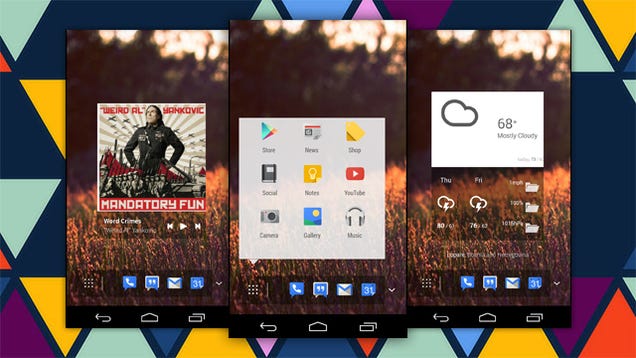
    Android: Chrome and Android may go together like a raccoon and a talking tree, but this Chrome OS design for Android home screens might bring the relationship to the next level.

    This design takes a lot of cues from the Chrome OS experience on laptops without completely ignoring Android's core. The design is a custom skin for Themer. To use it on your device, follow these instructions:

    1. Move the .zip to sdcard0 > MyColorScreen > Themer > Exported > zip (Your initial location may vary.)
    2. Open Themer and browse for themes.
    3. Under "My Themes" select "Exported."
    4. Choose "Chrome Experience Launcher.zip"
    Do you have an awesome, tweaked-into-oblivion home or lock screen of your own that you'd like to share? Post it in the comments below, or on your own Kinja blog with the tag "home screen showcase" (no quotes). Be sure to include a description of how you made it so we can feature it as the next featured home screen
    . 


    جميع الحقوق محفوظة ©2014-2015 | ، نقل بدون تصريح ممنوع . Privacy-Policy| تصميم : عبد الصمد بوطاهري